

By the end of this guide you will have a CCTools account and a connected wallet, and you will know where to find the Overview, the ecosystem directory, Featured Apps and governance on CCTools.
Before you start
- An email address, or a Google, X or Discord account.
- A Canton wallet you control, for the Portfolio step.
- About 30 minutes, most of it reading.
What you'll build
A CCTools account with a connected wallet in Portfolio, a few ecosystem projects upvoted, and governance alerts turned on.
Steps
Create your CCTools account
Go to the sign-up page and create an account with an email address, a username and a password, or sign up with Google, X or Discord. After you sign in, you land on the Overview.
Your account starts at Level 1 (Newcomer) with 0 XP. Some actions on the site, such as connecting a wallet or upvoting projects, earn XP.
Signing up with Google, X or Discord skips the password; the account works the same way.
You land on the Overview, and your level shows in the sidebar.
Connect your first Canton wallet
Open Portfolio from the sidebar. If no wallet is connected yet, it shows a Connect Canton wallet button, which opens a list of the Canton wallets CCTools can connect. Approve the connection in your wallet.
You can connect more wallets later (one per chain on a free account, up to five per chain with Pro) from the Connect wallet tile or the My Wallets window. Portfolio adds up your connected wallets, including EVM and Solana wallets, in US dollars.
To look at a Canton party without connecting it, paste its party ID into the Tracker.
# A Canton party ID looks like this
alice::1220abf3e9d2...4f91

# It is not your email or your profile name:
# it is the party your Canton wallet holds.CCTools never asks for your keys or your recovery phrase. Connecting a wallet can ask you to sign a message that proves you own it; that signature moves nothing. If a page ever asks for a private key or a recovery phrase, close it.
Portfolio shows the wallet as a card with its balance; a wallet that earned rewards in the last 30 days also shows them.
Skim the Overview dashboard
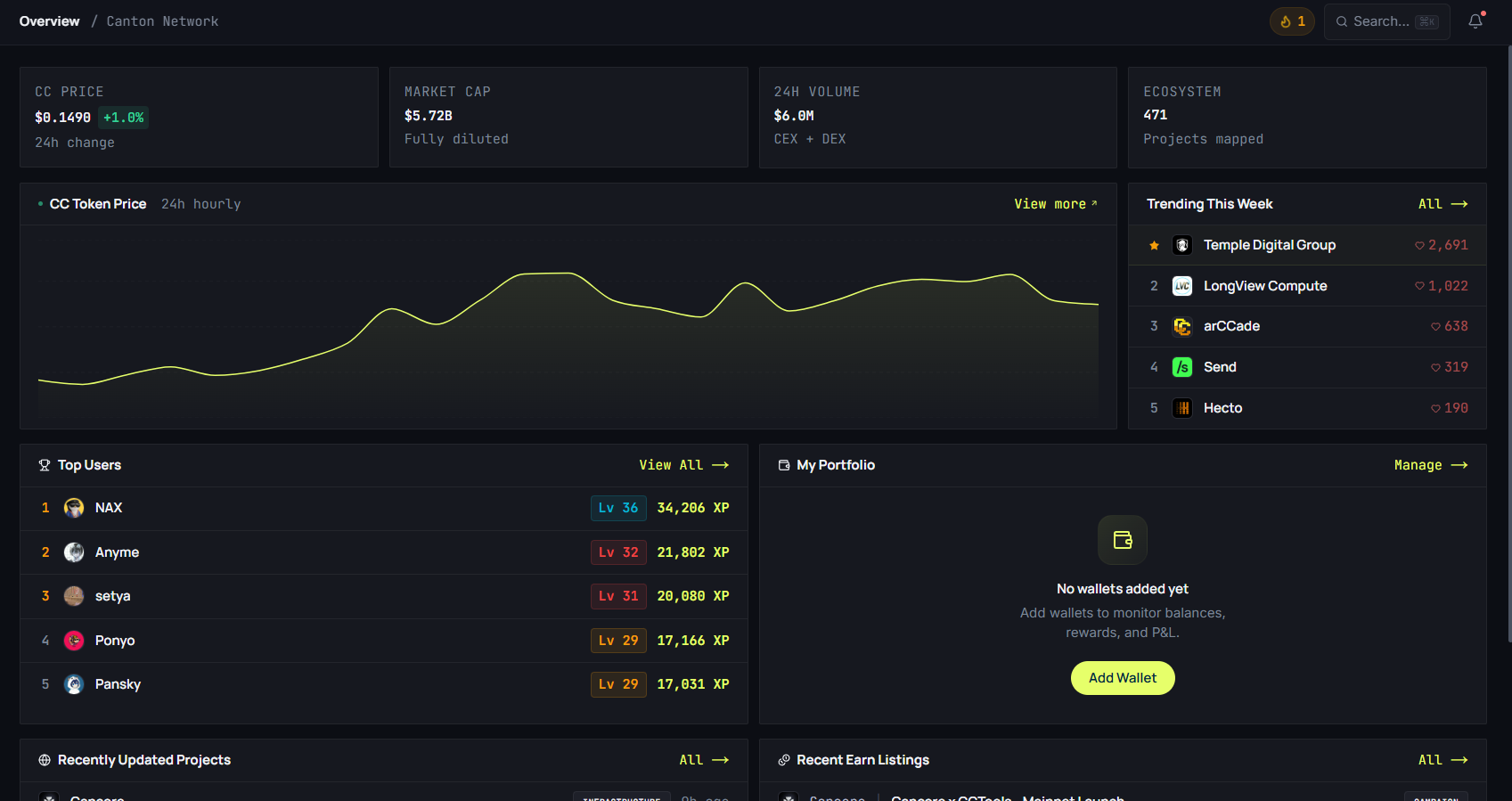
The Overview is a quick daily read. The top row shows CC's price with its 24-hour change, its market cap, its 24-hour volume and the number of ecosystem projects. Below come a 24-hour price chart, projects trending this week, top users, your portfolio, recently updated projects and recent Earn listings.
The price and the trending list refresh every 5 minutes. CCTools reads CC's price from CoinGecko, with CoinPaprika as a fallback.
Bookmark the Overview if you want one page to check each day.
Explore the ecosystem directory
Open Ecosystem for the directory of projects building on Canton. Each card shows the project's category, its role on the network where it has one (such as validator or featured app), a tagline, views and upvotes. Where a profile is complete enough, the card also shows an AI Project Score built from transparency, activity, community, documentation and maturity.
Upvote the projects you actually use. Upvotes rank projects on the Ecosystem tab of the leaderboard, and upvoting earns you XP.
The Compare page (under Ecosystem) puts up to three projects side by side: score, community, technical, business, team and Canton network details.
Read a Featured App detail page
From Featured Apps, open any app. Its page shows its rank by lifetime app rewards, its lifetime CC rewards, its party IDs, and a table of its rewards in the last 30 rounds, valued in USD at today's price.
The lifetime totals carry the date they are as of. The data provider behind them stopped updating after round 101,404 (22 Jun 2026), and the page says so next to each total.
The app page shows its rank, its lifetime rewards with their as-of date, and the rewards table.
Track governance
Open Governance to see the super validators' proposals. Each one shows its status (Active, Executed, Rejected or Expired), its vote tally and the time left. Opening a proposal shows its details, with a link to the CIP where there is one.
To hear about new proposals, turn on governance alerts in Settings, under Notifications. CCTools checks for new proposals every 15 minutes and sends a notification on the site to everyone who has the alerts on.
Each proposal has its own deadline, and its card shows how much time is left.
Earn XP and levels
CCTools has a gamification layer. Actions such as connecting your first wallet, signing in each day, upvoting projects, and having a project submission or an Academy post approved earn XP.
XP sets your level, from Level 1 to Level 50, in ten named tiers from Newcomer to Canton OG (Level 45 and up). Your level appears on your public profile, on the leaderboard and on your Academy author card.
After connecting a wallet and upvoting a few projects, your profile shows more XP than you started with.
Troubleshooting
My wallet shows 0 CC balance even though I know I have some
Check that the wallet you connected is the one that holds the CC: each Canton wallet has its own party ID. To look at a party without connecting it, use the Tracker. If the balance still looks wrong, tell us on the feedback page.
The confirmation email never arrived
Check your spam folder first. Signing up again with the same address sends a new confirmation email, up to three an hour to the same address. You can also sign up with Google, X or Discord instead.
My Featured App rank doesn't match what I see on other dashboards
CCTools ranks featured apps by lifetime app rewards, as of the date shown on the page. Other dashboards may rank by recent rewards or by other measures, so the order can differ. The About box at the bottom of the Featured Apps page explains what the page shows.
I can't find where to submit an ecosystem project
On the Ecosystem page, use the + Submit button in the toolbar; you need to be signed in. The form asks for the project's name, tagline, website, category, a description of at least 100 characters, a short summary of what it does on Canton, a contact email and a reference link. The CCTools team reviews submissions, typically within 24 to 48 hours.
Further reading
Price, market cap, volume, trending projects and recent listings.
Projects building on Canton, with scores, upvotes and links.
Featured apps ranked by lifetime app rewards, with the date of the totals.
Proposals with their status, vote tally and time left.
Articles and guides, this one included.